
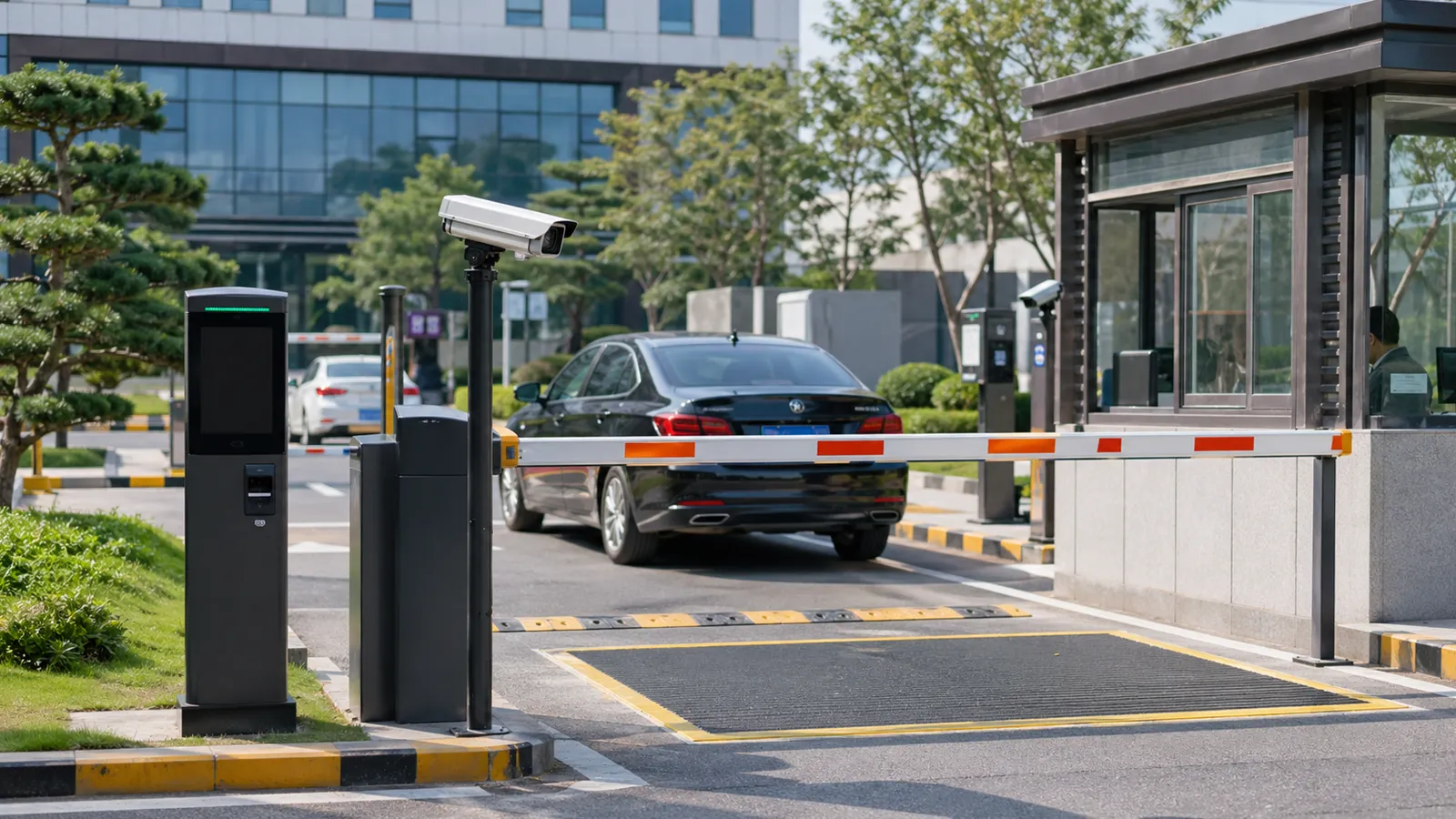
An intelligent parking system can improve vehicle flow, reduce queuing, support automatic billing, and help parking lot managers control entry and exit more efficiently. But stable performance depends on more than buying a barrier gate or installing a camera. Before installation, managers should confirm the lane layout, barrier gate position, camera angle, control unit location, guard booth arrangement, management computer distance, power supply, network connection, and future maintenance access.
A complete LPR or intelligent parking solution usually works as a coordinated system: the detector senses the vehicle, the camera captures the plate, the software checks access or payment rules, and the barrier gate opens or stays closed based on the result.
1. Start With the Site Layout, Not the Equipment
Before choosing equipment, check how vehicles actually enter, stop, turn, and exit the parking lot. A good intelligent parking system should match the real traffic flow of the site, not force drivers to adapt to a poor layout.
Parking lot managers should first confirm:
- Number of entrance and exit lanes
- Expected peak-hour traffic
- Vehicle types, such as cars, vans, trucks, or motorcycles
- Whether the site needs LPR, card reading, QR code payment, ticketing, or mixed access
- Whether staff will still manage exceptions manually
- Power and network availability near each lane
- Space for future upgrades
An intelligent parking system is commonly used to monitor and control vehicle access and can also support payment collection and traffic flow management.
2. Installation Location of the Barrier Gate and Control Unit
The installation location of the barrier gate and control unit directly affects driver convenience and safety. If the card reader, QR scanner, ticket machine, or access terminal is too close to the barrier arm, drivers may stop in the wrong position and risk hitting the arm.
In general, the distance between the barrier gate and the control unit should not be less than 2.5 meters. A distance of around 3.5 meters is recommended for smoother operation. This gives drivers enough space to stop, complete authentication, and wait for the barrier to open.
Lane width is also important. The lane should not be less than 3 meters wide. If the lane is too narrow, vehicles may slow down too much, turn awkwardly, or create congestion at the entrance and exit. A lane width of around 4.5 meters is recommended when site conditions allow.
Table 1: Intelligent Parking System Installation Checklist
| Installation Item | Recommended Requirement | Why It Matters |
|---|---|---|
| Distance between barrier gate and control unit | Minimum 2.5 m; recommended 3.5 m | Reduces the risk of vehicles hitting the barrier arm |
| Lane width | Minimum 3 m; recommended 4.5 m | Improves entry and exit traffic flow |
| Camera installation height | Usually 0.5–2.5 m, adjusted by site | Helps capture the license plate clearly |
| Guard booth area | Not less than 4 m² | Provides space for staff and management equipment |
| Computer host to card reader distance | Generally not more than 200 m | Supports stable communication |
| Power and network | Stable, protected, and easy to maintain | Reduces downtime and signal problems |
| Maintenance space | Reserved around barrier, camera, and booth | Makes future repair and inspection easier |
3. Choose the Correct Parking Barrier Gate Arm Length
The barrier arm length should match the lane width and the actual vehicle access requirement. A barrier arm that is too short cannot control the lane effectively, while an arm that is too long may increase motor load and reduce equipment life.
If the barrier gate arm needs to be cut or modified, the torque balance should be recalculated according to the new arm length. This helps prevent motor overheating, unstable movement, and gearbox wear.
Common mistakes include choosing a barrier arm only based on appearance, cutting the arm without adjustment, or installing a light-duty barrier gate in a high-frequency parking site. For busy parking lots such as shopping malls, office buildings, hospitals, and residential communities, the opening speed, duty cycle, and durability of the barrier gate should be considered together.
4. Install Cameras Where They Can Clearly Capture the Plate
Most intelligent parking systems include image comparison or LPR functions, so cameras should be installed at both entrances and exits. The camera view should cover the license plate position when the vehicle stops or slows down for access verification.
For the installation height, 0.5–2.5 meters is generally suitable for many parking entrance and exit scenarios. However, the final height should be adjusted according to the vehicle type, lane slope, license plate position, camera lens, and local plate format.
Camera angle is just as important as height. Industry guidance for license plate capture commonly recommends keeping the camera as close to head-on as possible and minimizing horizontal and vertical angle distortion. Axis notes that the capture distance is often about twice the mounting height when the horizontal and vertical angle between the camera and vehicle is less than 30°.
Lighting must also be checked before installation. Strong backlight, glare, shadows, rainy weather, dirty plates, reflective plates, and poor night lighting can all reduce recognition quality. For outdoor sites, it is better to use cameras or terminals with fill light and weather-resistant housing.
5. Plan the Guard Booth Location
Although intelligent parking systems can automate many tasks, some parking lots still need human supervision. Staff may need to handle cash payment, visitor disputes, damaged cards, license plate recognition errors, emergency access, or manual barrier control.
The guard booth is usually installed near the exit, because payment and exception handling often happen when vehicles leave. The booth should give staff a clear view of the exit lane, barrier gate, payment area, and nearby pedestrian movement.
The guard booth is essentially a small office. It usually contains staff seating, a management computer, communication equipment, cash or payment equipment, and sometimes a printer or intercom. The booth area should generally not be less than 4 square meters.
6. Confirm the Management Computer Location
The parking system management computer is usually installed inside the guard booth, control room, or property management office. Its location should be convenient for daily operation, monitoring, data query, and maintenance.
In general, the distance between the computer host and the card reader should not exceed 200 meters. If the distance is longer, the project should use a suitable communication design, such as network extension, fiber, controller relay, or other engineering solutions recommended by the system supplier.
The management area should support:
- Stable power supply
- Reliable network connection
- Parking record storage
- Real-time monitoring
- Fee calculation or payment checking
- Whitelist and blacklist management
- Remote maintenance if required
Software is an important part of the parking solution because it connects plate recognition, access rules, payment status, records, reports, and system integrations.
7. Prepare Power, Network, and Safety Protection
Many parking system problems are caused by weak basic infrastructure. Even high-quality equipment may fail if the power supply is unstable, the network cable is poor, the grounding is incomplete, or outdoor wiring is not protected.
Before installation, check whether each entrance and exit lane has a stable power source, waterproof conduit, grounding, surge protection, and safe cable routing. Network cables should be protected from water, crushing, and electromagnetic interference.
Safety devices should also be considered. Automated gates and barrier systems may require anti-smashing protection, vehicle detectors, radar sensors, photoelectric sensors, or other safety devices depending on local regulations and project risk. For example, UL 325 is a recognized safety standard for automated gate operators, and some gate safety guidance requires entrapment protection devices for potential danger areas.
8. Test the Whole System Before Opening the Parking Lot
After installation, do not test each device separately only. The whole system should be tested as a complete workflow.
A practical test should include:
- Vehicle detection
- Plate capture or card reading
- Software rule verification
- Barrier opening and closing
- Anti-smashing protection
- Payment or authorization check
- Manual opening from the booth
- Data record storage
- Network disconnection recovery
- Night and rainy-day recognition
This is important because a parking system can fail even when each individual device appears normal. For example, the camera may read the plate correctly, but the software rule may be incomplete. The barrier may open correctly, but the detector may trigger too late. The payment system may work, but the exit lane may still become congested during peak hours.
9. Common Installation Problems and Solutions
| Problem | Possible Cause | Recommended Solution |
|---|---|---|
| Vehicle hits the barrier arm | Barrier gate too close to the control unit | Keep at least 2.5 m distance; 3.5 m is recommended |
| Entry or exit congestion | Lane too narrow or poor stopping position | Use at least 3 m lane width; 4.5 m is better where possible |
| Barrier motor overheats | Arm length changed without balance adjustment | Recalculate torque balance after cutting or replacing the arm |
| LPR recognition fails at night | Poor lighting, glare, or wrong camera angle | Add fill light and adjust camera angle/height |
| Camera captures the wrong area | Camera not aligned with the real plate position | Test with actual vehicles before final fixing |
| Software cannot communicate with equipment | Distance too long or weak network connection | Keep host-reader distance within design limits and use stable cabling |
| Staff cannot manage exceptions quickly | Guard booth placed too far from exit | Install booth where staff can see and control the exit lane |
| Frequent maintenance problems | Wiring exposed or no maintenance space reserved | Protect cables and leave service access around equipment |
10. Plan for Maintenance From the Beginning
Proper installation can reduce many future problems, but regular maintenance is still necessary. Parking lot operators should clean camera lenses, check barrier arm balance, inspect cables, test safety sensors, update software rules, and review system logs regularly.
For high-traffic parking lots, maintenance should be scheduled more frequently. Barrier gates, loop detectors, cameras, and payment devices work many times each day, so small problems can quickly affect the user experience.
A good maintenance plan should include:
- Camera cleaning
- Barrier arm and spring inspection
- Motor and gearbox checks
- Sensor and loop detector testing
- Software backup
- Access rule review
- Payment record verification
- Emergency manual operation test
Conclusion
Installing an intelligent parking system is not only about placing a barrier gate at the entrance. It requires careful planning of the lane, control unit, camera, guard booth, management computer, power supply, network, safety devices, and future maintenance.
A well-installed system can improve parking space utilization, reduce queuing at entrances and exits, support automatic vehicle identification, and make parking lot management more efficient. For parking lot owners, contractors, and property managers, the best approach is to design the system around the actual site conditions first, then select the equipment that matches the layout, traffic volume, and management requirements.
FAQ
1. What is the most important thing to check before installing an intelligent parking system?
The most important thing is the site layout. Parking managers should check lane width, vehicle flow, barrier gate position, camera view, power supply, network connection, and management area before choosing equipment.
2. How far should the barrier gate be from the control unit?
The distance should generally not be less than 2.5 meters. Around 3.5 meters is recommended to give drivers enough space to stop and complete access verification safely.
3. What is the recommended lane width for a parking entrance or exit?
The lane width should generally not be less than 3 meters. If the site has enough space, around 4.5 meters is recommended for smoother vehicle movement.
4. Where should the LPR camera be installed?
The camera should be installed where it can clearly capture the license plate when the vehicle slows down or stops for verification. The camera should be aligned with the real vehicle path, not only with the theoretical lane center.
5. Why does the parking barrier arm length matter?
Barrier arm length affects motor load and torque balance. If the arm is too long or is cut without adjustment, it may cause motor overheating, unstable movement, or faster gearbox wear.
6. Is a guard booth still necessary in a smart parking lot?
Many parking lots still need a guard booth for fee collection, visitor support, exception handling, manual control, and emergency management. Fully unattended parking is possible, but it requires stronger software, payment, and remote support design.
7. How far can the management computer be from the card reader?
The distance between the computer host and the card reader should generally not exceed 200 meters, unless the system is designed with suitable communication extension.
8. How can parking lot managers reduce future maintenance problems?
They should choose stable components, protect wiring, test the full system before opening, clean cameras regularly, inspect the barrier gate, check safety sensors, and maintain software records.