
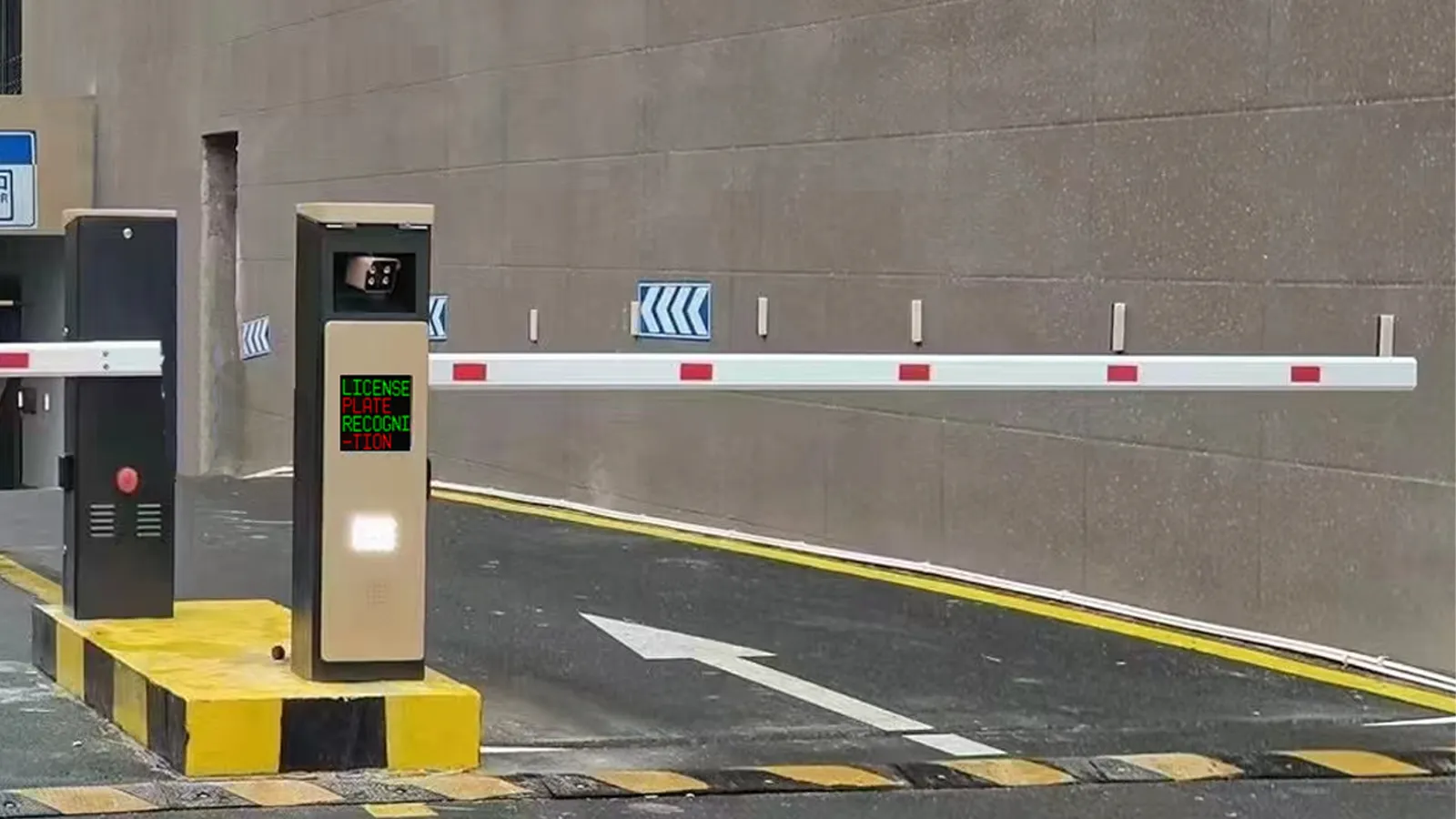
An LPR parking system is not just a camera at the gate. It is a coordinated access-control setup in which a detector senses the vehicle, the camera captures the plate, the software decides what should happen next, and the barrier gate carries out that decision. In most parking projects, stable performance depends on how well these parts work together, not on any single device alone.
For buyers, the practical question is simple: which components are essential, what does each one do, and where should you avoid cutting corners? This guide answers those questions in plain language so property managers, integrators, and parking operators can evaluate an LPR solution more confidently.
What Is an LPR Parking System?
LPR stands for License Plate Recognition. In parking management, it means a system uses cameras and OCR-based recognition to read a vehicle’s plate at entry or exit, then turns that plate number into a usable digital credential for access control, parking sessions, payment checks, reporting, or enforcement. Many suppliers also use ANPR or ALPR for the same core workflow.
Compared with traditional ticket or card parking, LPR reduces reliance on physical media. Instead of printing a ticket or requiring a driver to scan a card, the system records the vehicle plate, checks rules in software, and logs the event automatically. That is why LPR is widely used in gated car parks, residential communities, office parks, hotels, hospitals, and mixed-use sites.
How an LPR Parking System Works
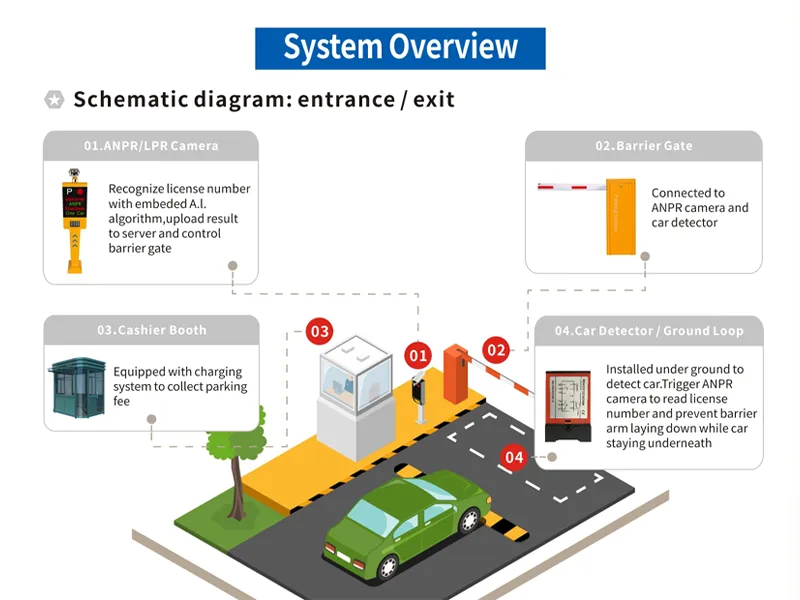
At lane level, the workflow is straightforward: detect the vehicle, capture the plate, verify the rule, and open or deny the lane. The software also stores the entry and exit data so operators can manage permissions, parking records, and fee logic later.
Table 1. LPR parking system workflow at a glance
| Step | Main component | What happens |
|---|---|---|
| 1 | Loop detector / vehicle detector | Detects a vehicle in the lane and triggers the next action |
| 2 | LPR camera | Captures the license plate image at the right moment |
| 3 | Recognition software | Reads the plate and matches it with rules, permissions, or payment status |
| 4 | Barrier gate | Opens for approved vehicles or stays closed when access is not allowed |
| 5 | Parking management platform | Stores records for billing, reporting, whitelists, blacklists, and audits |
This is also why an LPR project should be designed as a full system rather than a standalone camera purchase. A high-quality plate read still produces a poor user experience if the detector triggers too late, the software rules are incomplete, or the barrier gate responds too slowly.
LPR Camera: The Core Device for Plate Recognition
The camera is the part that actually captures the number plate, so it has the biggest direct impact on recognition accuracy. Modern parking LPR cameras typically combine high-resolution imaging, OCR, and low-light support such as infrared illumination to improve plate reads in day, night, glare, and underground conditions. Some designs process recognition on the camera itself, while others send images to a server or platform for recognition and rule matching.
In practice, camera performance is not only about the sensor. Installation angle, lane width, vehicle speed, lighting, mounting height, and plate cleanliness all affect results. A good camera installed at the wrong angle will underperform. That is why entrance and exit cameras are usually selected and positioned according to the real lane environment, not only the product datasheet.
For buyers, the most useful questions are: Does the camera support local plate formats? Can it handle difficult light conditions? Is recognition embedded or platform-based? Does it work reliably in stop-and-go lanes as well as faster lanes? These questions matter more than headline megapixels alone.
Barrier Gate: Turning Recognition into Physical Access Control
If the camera and software make the decision, the barrier gate is the device that turns that decision into real lane control. In a typical authorized-entry workflow, the camera reads the plate, the software checks the vehicle against an approved list or parking rule, and the gate opens automatically.
That means the barrier gate should be chosen for the site’s real operating conditions. In busy projects, buyers should look at opening speed, intensive-use capability, obstacle protection, and recovery behavior during power loss. Barrier manufacturers commonly highlight rapid cycle times, intensive-use design, and safety features that raise the arm if an obstacle is detected during closing.
A common mistake is treating the gate as a simple accessory. It is not. A reliable LPR project needs a gate that matches traffic volume, lane width, arm length, and safety requirements. A residential site with moderate traffic may need a different barrier profile from a shopping center, logistics site, or office park with heavy peak-hour flow.
Loop Detector: Why Vehicle Detection Still Matters
Many buyers ask an important question: if the camera can see the vehicle, why use a loop detector at all? The answer is timing and safety. A loop detector senses the metal mass of a vehicle over a wire loop buried in the ground, then sends a signal to the controller. In parking lanes, that signal is commonly used either to trigger the lane workflow or to prevent the barrier arm from closing while a vehicle is still underneath it.
This is why loop detectors remain common even in modern camera-based projects. They help the camera capture the plate at the correct moment, and they add a dependable physical safety layer that does not rely only on image recognition. Elsema describes the two classic roles clearly: an exit loop can open the gate when a vehicle approaches, while a safety loop prevents the gate from closing on a vehicle that is still in the lane.
In many barrier-gate installations, two ground loops are standard: one for activation and one for vehicle protection. OPTEX notes that barrier gates often use a first loop for activation and a second loop for protection, though some projects may use alternative sensors such as microwave or ultrasonic vehicle detection when cutting the driveway is not ideal.
For buyers, the real lesson is that detector design is part of system stability. Loop size, lane width, retrofit versus new construction, and the exact placement under the barrier all affect reliability. A poor detector layout can cause false triggers, slow response, or safety complaints even when the camera itself performs well.
Parking Management Software: The Brain of the Entire System
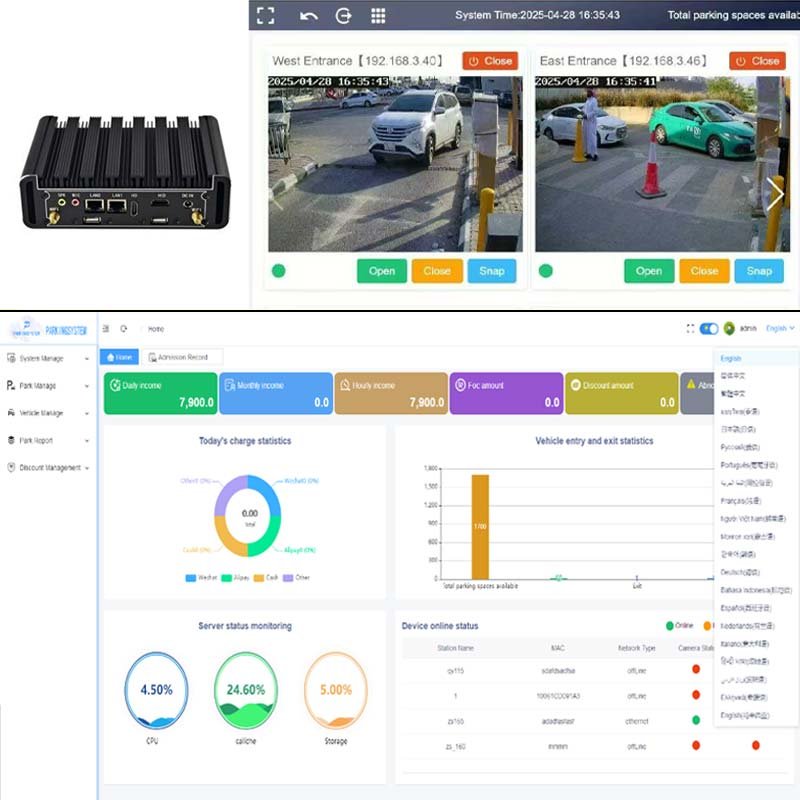
The software is where an LPR system becomes a parking solution rather than a plate-reading device. It connects the plate read to actual business rules, such as whitelist access, blacklist alerts, visitor approval, payment status, fee rules, session records, logs, and reports. It also coordinates how the camera, controller, and barrier gate respond in real time.
This is also the component that determines whether the system can expand later. A simple site may only need entry and exit records plus basic authorization, but larger projects often need monthly parking, hotel validation, apartment visitor workflows, office tenant permissions, ERP integration, or multi-site management. Software flexibility matters because parking rules almost always become more complex over time.
For ShunjieBarrier projects, the software is available free of charge. For projects that need software with support for secondary development, it can be obtained by contacting info@shunjiebarrier.com.
In practical terms, “supporting secondary development” usually means the software can be adapted for local integrations and custom workflows. Examples include connecting with property management systems, hotel systems, tenant databases, visitor reservation tools, or customized fee rules. This matters for distributors and integrators because the hardware lane may stay the same while local software requirements vary from one market or project to another.
Optional Components That Improve the Full Parking Experience
The four core elements above are enough to run a basic LPR lane, but many projects add optional devices to improve convenience, revenue control, or navigation. Common examples include cashier booths, self-service payment terminals, LED screens, display terminals, parking guidance screens, and occupancy indicators. Parking suppliers commonly integrate LPR cameras with payment kiosks and cloud or back-office software, especially in ticketless pay-by-plate workflows.
Parking guidance is especially useful for larger sites. Hikvision describes parking-guidance systems as using parking cameras to collect information about parked vehicles and available spaces, then displaying that information on screens for centralized management. TKH similarly describes camera-based parking-guidance systems that use sensors with LED indicators to show whether a space is occupied or available.
That means parking operators do not have to think only about entry and exit. In shopping malls, hospitals, airports, and multi-level garages, the best user experience often comes from combining access control with guidance, payment, and clear on-site display.
How the Main Components Work Together in Real Projects
In residential communities, the most important priorities are usually convenient authorized access, visitor management, and low daily manual work. In office parks, software permissions, monthly parking, and reporting often matter more. In commercial sites such as malls or mixed-use projects, payment rules, throughput, and parking guidance typically move higher on the priority list.
The key point is that the component list may look similar across projects, but the design priorities are different. A residential gate can fail because the visitor workflow is weak. A mall gate can fail because the payment and throughput logic is weak. A technically correct hardware package is not always a commercially correct parking solution.
Table 2. What buyers should check before choosing each component
| Component | What to verify before buying | Why it matters |
|---|---|---|
| LPR camera | Plate format support, low-light performance, installation distance, lane angle, embedded AI or server recognition | Directly affects recognition accuracy and project adaptability |
| Barrier gate | Opening speed, duty cycle, arm length, anti-crush protection, power-failure behavior | Affects throughput, safety, and day-to-day reliability |
| Loop detector | Number of loops, installation method, lane width, trigger logic, safety zone coverage | Affects capture timing, false triggers, and vehicle protection |
| Software | Whitelist/blacklist rules, fee settings, reports, local or cloud deployment, API or secondary development support | Affects future integration, customization, and long-term value |
Common Problems Buyers Should Avoid
One common mistake is over-focusing on recognition accuracy while underestimating installation conditions. Even a strong camera can struggle if the lane is too wide, the angle is poor, the lighting is harsh, or the plate is captured too late.
Another mistake is treating the loop detector as optional without understanding its safety function. In many projects, the detector is not there just to trigger the system. It is also there to stop the barrier from closing on a vehicle.
A third mistake is buying hardware first and thinking about software later. The software decides how visitor vehicles are approved, how long-stay vehicles are billed, how records are stored, and how exceptions are handled. If the software cannot match local rules, the project becomes difficult to operate even when the camera and gate are working.
Finally, some buyers choose the cheapest lane package without planning for integration or growth. That can create problems when the project later needs hotel validation, apartment resident lists, parking guidance, payment expansion, or secondary development.
How to Choose the Right LPR Parking System Components
Start with the site, not the product. Count the lanes, check whether the site is residential or public paid parking, estimate peak-hour traffic, and define whether the project needs simple access control or full parking management with charging and reporting. That step usually determines the real hardware and software requirements faster than comparing product brochures.
Then confirm the four core points. First, can the camera read the local plate reliably in the real environment? Second, can the barrier gate handle the site’s traffic and safety demands? Third, is the detector layout correct for activation and anti-crush protection? Fourth, can the software support the project’s current rules and future expansion?
For buyers who need a complete solution rather than separate parts, it is usually better to evaluate the project as one coordinated system. ShunjieBarrier can support complete LPR parking solution design, OEM customization, and software consultation for distributors, contractors, and project owners.
Final Thoughts
A reliable LPR parking system is never “just a camera.” It is a combination of capture, detection, decision-making, and controlled lane movement. When the camera, barrier gate, loop detector, and software are selected as one system, parking becomes faster, safer, and easier to manage.
For projects that may need future integration, the software deserves special attention. Hardware gets vehicles through the lane, but software determines whether the solution stays useful as parking rules, user types, and business requirements evolve.
Shunjie Barrier Supports
Need a complete LPR parking solution for your project? Contact ShunjieBarrier for hardware selection, OEM customization, and free parking software consultation. For software that supports secondary development, email info@shunjiebarrier.com.
FAQ
What are the main components of an LPR parking system?
The four core components are the LPR camera, barrier gate, loop detector or vehicle detector, and parking management software. Optional components can include payment stations, LED displays, and parking-guidance devices.
Does an LPR parking system always need a loop detector?
Not always, but many projects still use one because it improves trigger timing and adds safety. In barrier-gate applications, it is common to use one loop for activation and another for vehicle protection.
How does the barrier gate know when to open?
The camera reads the plate, the software checks the plate against access or payment rules, and the controller sends the open command to the barrier gate if the condition is met.
What affects license plate recognition accuracy the most?
Camera placement, lighting, lane design, vehicle speed, plate condition, and whether the system captures the image at the correct moment all affect recognition quality.
What does the software do besides reading plates?
It manages permissions, parking records, fee rules, reports, entry and exit logs, and integration with other systems. It is also the part that supports future customization.
Can ShunjieBarrier software support secondary development?
Yes. The article can state that ShunjieBarrier software is free of charge, and software supporting secondary development can be obtained by contacting info@shunjiebarrier.com.
Is LPR better than ticket parking?
For many sites, yes, because it can reduce manual steps and physical ticket handling. But the best choice still depends on traffic flow, user type, payment model, and software requirements.
Which types of sites benefit most from LPR parking?
Residential communities, office parks, shopping centers, hospitals, hotels, gated garages, and mixed-use facilities are all common applications.